Configure link
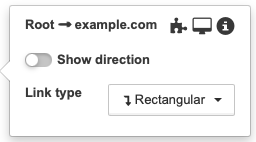
Link settings can be set in the standard view. If you hover over the link and wait a bit, then the popup will appear that would allow you to customize the following settings:
-
add widget to the link
 ;
; -
open link’s end view
 ;
; -
open information modal with information about link
 ;
; -
hide or display link direction;
-
change link type;
-
display and config existing widgets.
More settings are available in the end view in the parameters sections.
| You can switch to the end view by left-clicking on the link. |